Schedule Signing
only available in victoria
With Scheduled Signing, the signing process will start automatically on the completion of the Info Request.
Check out our video tutorial or read the step-by-step instructions below!
Scheduled Signing is ONLY available on the following forms:
Residential Exclusive Leasing and Managing Authority — (PM0004)
General Cover Page — (GN0002)
Navigate to the
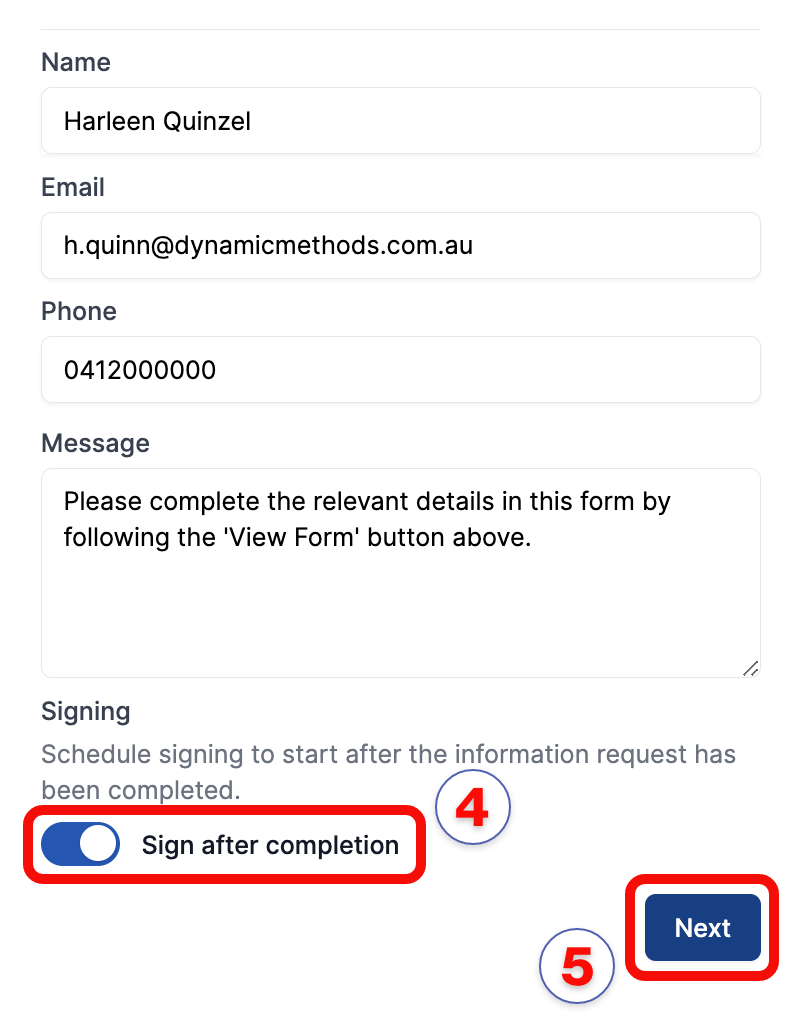
Info Requesttab in the right sidebar.Enter the recipient's details —
Name,EmailandPhone.Add an optional customised message.
Click the
Sign after Completiontoggle to activate Scheduled Signing.Click
Next.
note
The Scheduled Signing info bubble will be displayed, indicating this feature is activated.
Enter the
AgentandClientfields where needed.Click
Next.Review
Info Request, then clickSubmit & Schedule.

note
The form will be automatically finalised and sent for signing on completion of the Information Request.